A knowledge base my agents can read
Halfway through giving my notes a new home, the sync tool froze and refused to continue, and that refusal is the best thing any tool has done for me this month. My AI co-conspirator, wiring up the new sync mesh, had enrolled what it believed was a new machine; the “new” machine was actually my existing laptop under another name, and the misconfiguration repointed a live sync folder at an empty directory. Years of irreplaceable notes were one propagation away from deletion. Nothing was lost.
I keep a personal knowledge base the way other people keep a garage: years of accumulated notes on projects, ideas, references, and half-finished thoughts, most of it valuable and none of it navigable by anyone but me. Mine lives in Obsidian, a note app whose best feature is what it doesn’t do: it stores everything as plain markdown files in a folder. No database, no proprietary format, no export button needed, because there’s nothing to export from. I call the vault Kernel, and it has become the most durable data I own; apps have come and gone around it for years while the files just sat there being text.
That durability recently earned Kernel a bigger job, because the colophon of this blog made a claim I keep having to live up to: I switch AI tools constantly, chasing whichever model is best this month. Switching is only cheap if your data doesn’t care which tool is reading it. Lock a knowledge base in one app’s cloud and you’ve let it pick your AI vendor for you. Plain files on my own hardware keep my options open.
So the vault moved home. The files now live on the homelab’s storage pool, and every device syncs against it over Syncthing, an open-source sync mesh that replaced the note app’s paid sync service (that subscription is canceled; the sticker on my rack about the cloud being someone else’s computer applies to notes too). Obsidian is still how I read and write, but it’s now what it always really was: a nice window onto a folder.
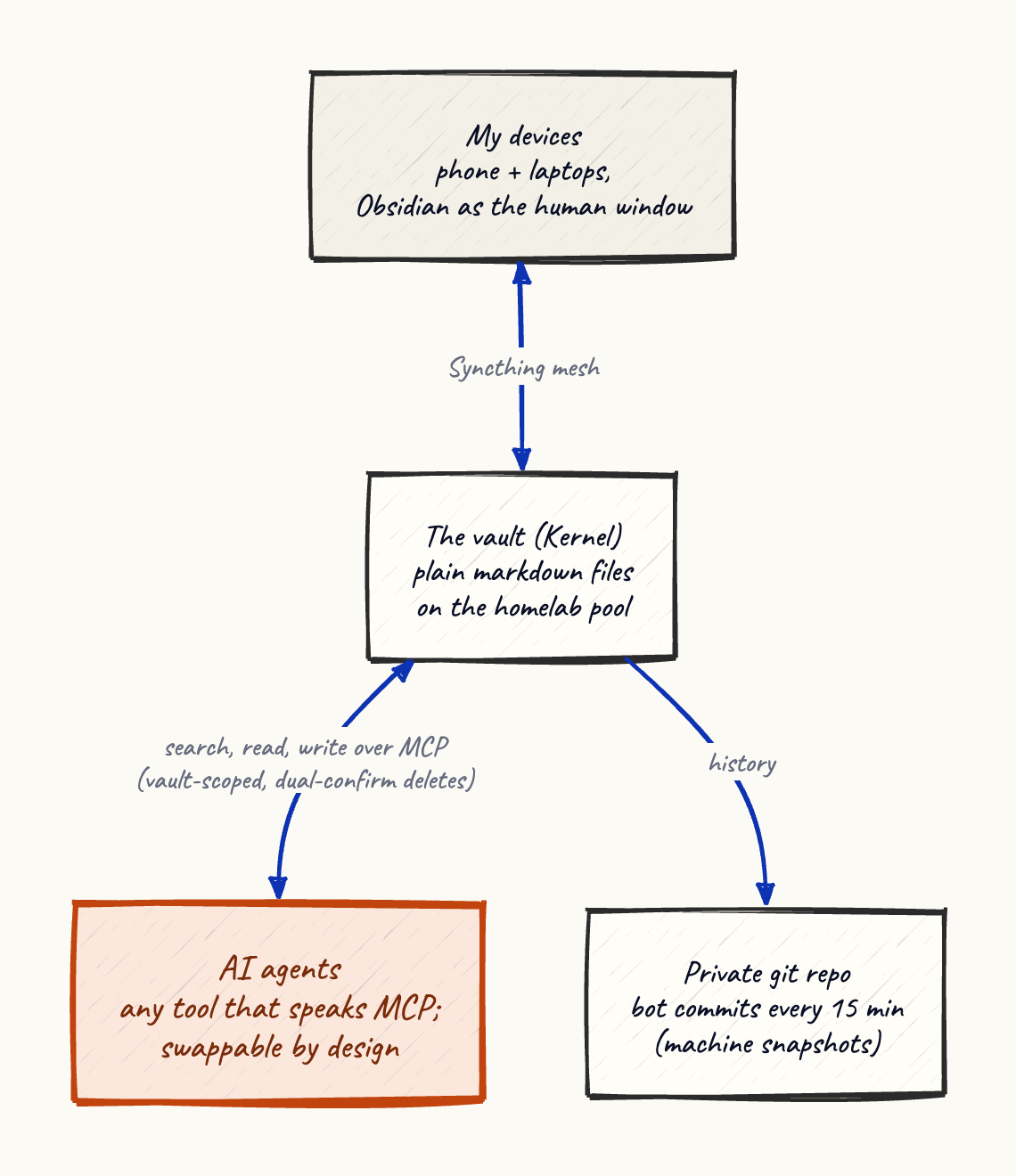
A small service I assembled from open-source parts now exposes the vault over MCP: any assistant that speaks it (and they all do now) can search my notes, read them, and write new ones, with the same files a human edits. The server is filesystem-direct, so nothing else has to be running, and it’s scoped so it can only see the vault, and destructive operations require a second confirmation. Because the protocol is a standard and the format is plain text, the AI tool on the other end is swappable. When I change models next month, the new one inherits my notes on day one, the same way a new employee inherits the filing system rather than the previous employee’s brain.
A tiny container also commits the vault to a private git repository every 15 minutes under its own bot identity, machine snapshots rather than authored commits. Between sync, snapshots, and git, a note now has three independent ways to survive me doing something dumb.
Which brings the story back to the freeze. Syncthing’s safety interlock (a marker file it expects inside every synced folder) noticed the folder wasn’t what it claimed to be and stopped, instead of syncing the mistake outward and deleting years of notes while looking productive. Agents doing infrastructure work need the same thing agents doing alert triage need: systems whose defaults refuse to propagate a confident error.